Case
Moodive
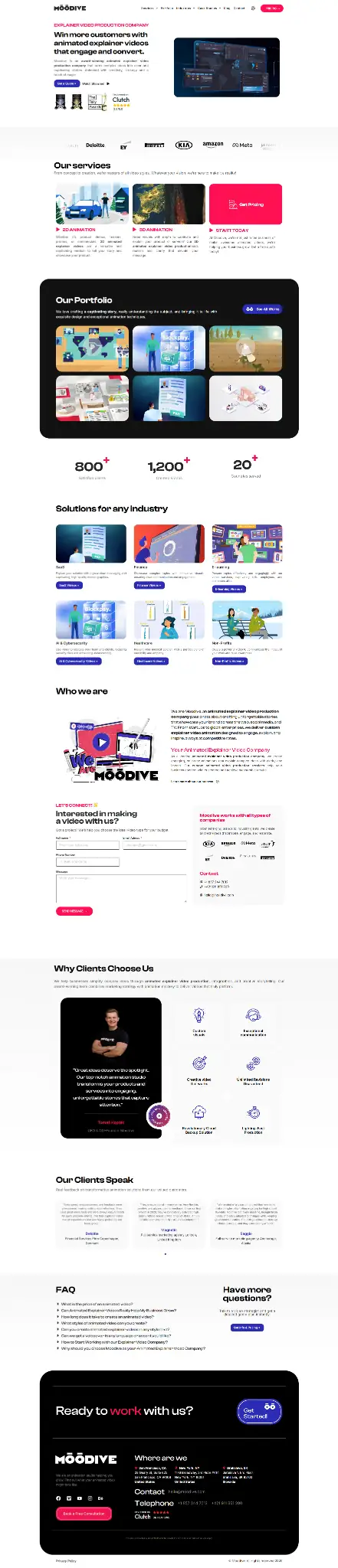
A portfolio where video is the main content. We replaced the carousel with a two-row infinite marquee that filters categories over AJAX without reloading the page.
Open moodive.com- Client
- Moodive
- Sector
- Animation studio, international
- Year
- 2025
- Role
- Design + development
- Stack
- WordPress, JavaScript, CSS mix-blend-mode
Animation studio, international 2025
The brief
An international studio making animated explainer videos. Video is the main content of the portfolio, so the whole site rests on how the work can be browsed without waiting for it to load.
A standard carousel did not work here — it made the visitor click and wait instead of seeing the volume of work at once.
What was solved
- Replacing the carousel with a two-row infinite marquee that shows the volume of work at a glance
- AJAX category filtering without reloading the page
- Tinting the service cards with CSS mix-blend-mode to match the colours of the project inside them
- A multilingual version of the site
- Video playback that does not sink page speed
Why a standard carousel does not work in a video portfolio
A carousel makes the visitor click and wait, when what they want is to see the volume of work at once. For an animation studio that is fundamental — within a few seconds a person should get a picture of the range and the style, not click through eight slides.
We replaced it with a two-row infinite marquee, with the rows scrolling smoothly in opposite directions. Once it has loaded there are twelve projects on the screen instead of one. That is the whole difference.
Filtering categories without reloading the page
We wired the filters through AJAX, so switching a category does not trigger a new page load. In practice it means a visitor goes through three categories in a few seconds and does not lose the position they were at.
Technically it is a call to admin-ajax.php that returns only the list of items, not the whole page. The marquee redraws in place. The address in the browser is updated as it does, so a link to a particular category can be sent and bookmarked — that is the detail most often forgotten with AJAX filters, and then the filtered view cannot be shared.
Colour tinting of the cards with mix-blend-mode
The service cards take their colour from the project inside them, without separate graphics having to be made for every project. This is handled by the CSS property mix-blend-mode, which blends layers much as a graphics editor does.
A card has a coloured base layer and the video preview above it in blend mode. When the video is swapped, the tone adjusts by itself. The client can add projects without having to work out each time whether it fits the colours of the rest of the page.
Video that does not sink page speed
Video is the heaviest content on the web and the portfolio has dozens of them on the home page. We dealt with it in three ways at once: previews load only as they come close to the screen, a short lightweight loop plays instead of the full track, and the full video starts only on click.
The order is what matters. The first image the user will see has to load first; everything else can wait. Without that distinction the site downloads tens of megabytes of content nobody will see, and the LCP metric collapses.
Several languages
The studio works internationally, so the site runs in several language versions. On a multilingual site what matters most is what is not visible — correct hreflang links between the versions, so the search engine knows these are translations of the same page and not duplicate content.
What another creative studio can take from this
If your main content is visual work, the site has one job: to show volume and quality before the visitor loses patience. That means more work on the screen at once and less clicking.
The second thing: a portfolio that is hard to add to stops being current within a year. Adding a project should mean uploading a file and choosing a category — not editing a template. If that is not the case, the site goes stale regardless of how good it looked at launch.
How it turned out
The portfolio is smooth to browse and adding a new project is a matter of uploading a video and assigning a category — not editing a template.